

What is Microsoft Azure?
Microsoft Azure is a cloud computing platform offering services like computing, networking, storage, databases, AI, and DevOps. It enables developers and businesses to build, deploy, and scale applications globally without managing physical infrastructure.
Why Learn Azure?
High demand: Cloud skills are among the most sought-after in IT. Flexibility: Supports multiple programming languages, frameworks, and operating systems.
Career growth: Roles like Cloud Architect, DevOps Engineer, and AI Specialist often require Azure expertise.
Where to Start Your Azure Journey?
Step 1: Create a Free Azure Account
Sign up at Azure’s official site to access free credits and services.
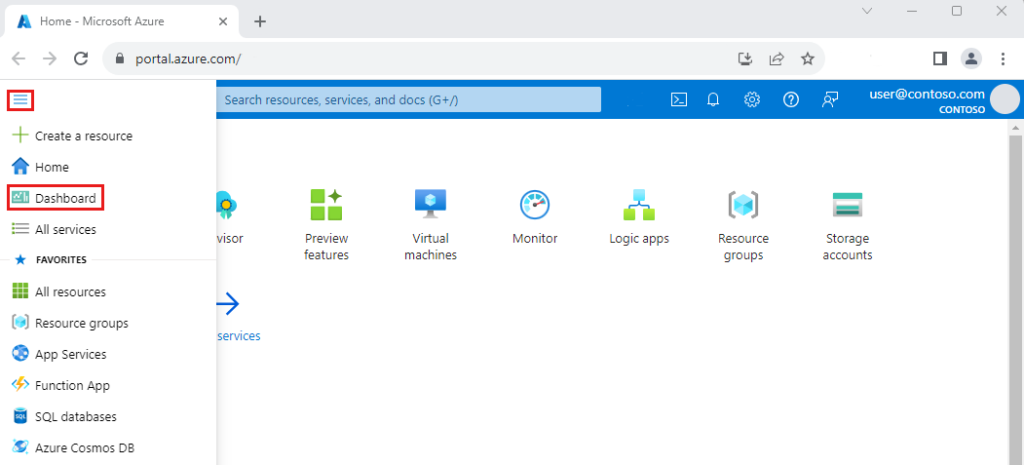
Step 2: Explore the Azure Portal
The portal is your dashboard to manage resources, virtual machines, databases, and more.
Step 3: Learn Core Services
Begin with: Azure Virtual Machines (VMs) – run applications in the cloud.
Azure Storage – store files, blobs, and databases.
Azure Networking – connect services securely.
Azure Active Directory – manage identities and access.
Step 4: Hands-On Practice
Use the Azure Sandbox or free tier to experiment with creating VMs, deploying web apps, and setting up databases.
Step 3: Learn Core Services
Begin with:
- Azure Virtual Machines (VMs) – run applications in the cloud.
- Azure Storage – store files, blobs, and databases.
- Azure Networking – connect services securely.
- Azure Active Directory – manage identities and access.
- Step 4: Hands-On Practice
Use the Azure Sandbox or free tier to experiment with creating VMs, deploying web apps, and setting up databases.
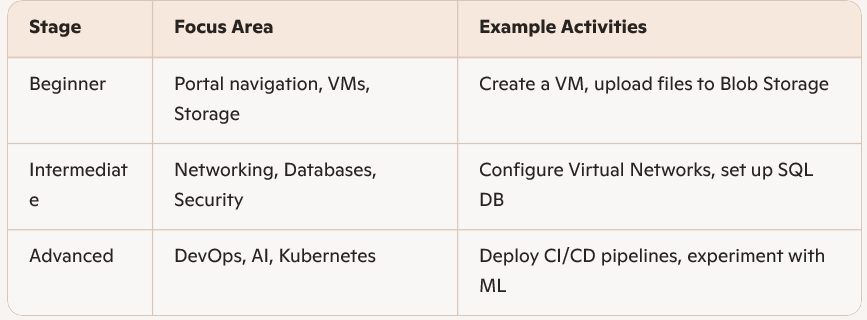
4. How to Build Your Learning Path