Playwright has quickly become one of the most popular automation frameworks in the world of automation. It’s fast, reliable, developer‑friendly, and built for the modern web. If you’re coming from Selenium or starting fresh, Playwright gives you a powerful and enjoyable automation experience.
What Is Playwright?
Playwright is an open-source automation framework created by Microsoft. It allows you to automate browsers like: Chromium (Chrome, Edge) Firefox WebKit (Safari) Unlike older tools, Playwright was designed for modern web apps that use dynamic content, single-page architecture, and heavy JavaScript.
Why Playwright Is So Popular
1. Auto‑wait Mechanism Playwright automatically waits for elements to be ready — no need for manual waits or sleeps. 2. Cross‑Browser & Cross‑Platform Run tests on: Windows macOS Linux Mobile emulation 3. Fast Execution Playwright runs tests in parallel by default, making it extremely fast. 4. Built‑in Test Runner It includes: Assertions Reporters Parallel execution Fixtures 5. Supports Multiple Languages You can write Playwright tests in: JavaScript / TypeScript Python Java .NET
Installing Playwright (JavaScript Example)
Code Highlighting
npm init playwright@latest
This installs: Playwright Browsers Example tests Test runner
Understanding Playwright’s Core Concepts
1. Browser Represents the actual browser instance (Chrome, Firefox, etc.) 2. Context A clean browser profile — like an incognito window. 3. Page A single tab inside the browser. 4. Locator A smart way to find elements on the page.
🚀 Your First Playwright Script: Automating Google Search Below is a simple, beginner‑friendly script that: Opens Google Types a search query Presses Enter Waits for results Prints the first result title This example uses JavaScript with the Playwright Test Runner.
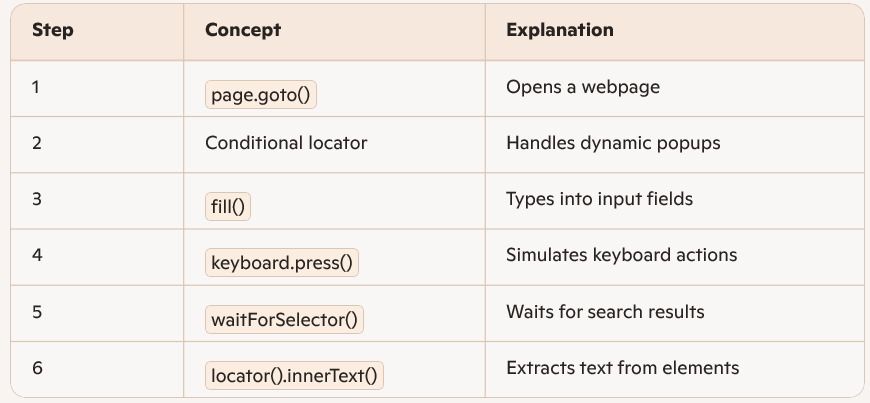
✅ What This Script Demonstrates page.goto() fill() keyboard.press() waitForSelector() locator().innerText()
🎯 Tips for Beginners ✅ Use Playwright Inspector Run tests with:
npx playwright test –debug
This opens a GUI where you can: Step through tests Record selectors Debug failures ✅ Prefer Locators Over XPath Playwright’s locators are smarter and more stable. ✅ Use Auto‑Wait Avoid manual waits — Playwright handles it for you.
🎉 Final Thoughts Playwright is one of the most powerful tools for modern web automation. Its speed, reliability, and developer‑friendly design make it ideal for beginners and experts alike. Once you master the basics — browser, context, page, and locators — you can automate almost anything. If you want, I can also help you with: ✅ Playwright framework design ✅ Parallel execution setup ✅ API testing with Playwright ✅ Page Object Model (POM) ✅ Playwright + Docker ✅ Playwright + CI/CD Just tell me what you want to explore next.
Your First Playwright Script: Automating Google Search
Below is a simple, beginner‑friendly script that: Opens Google Types a search query Presses Enter Waits for results Prints the first result title This example uses JavaScript with the Playwright Test Runner.
Playwright Script: Google Search Automation
Code Highlighting
    const { test, expect } = require('@playwright/test');

    test('Google Search Automation', async ({ page }) => {

    // Step 1: Navigate to Google
    await page.goto('https://www.google.com');

    // Step 2: Accept cookies if the popup appears (optional)
    const acceptButton = page.locator('button:has-text("Accept")');
    if (await acceptButton.count()) {
        await acceptButton.click();
    }

    // Step 3: Type search query
    await page.locator('input[name="q"]').fill('Playwright automation');

    // Step 4: Press Enter
    await page.keyboard.press('Enter');

    // Step 5: Wait for results
    await page.waitForSelector('h3');

    // Step 6: Extract first result title
    const firstResult = await page.locator('h3').first().innerText();
    console.log('First Result:', firstResult);

    // Assertion (optional)
    await expect(page).toHaveTitle(/Playwright/);
    });
What This Script Demonstrates
Tips for Beginners
Use Playwright Inspector
Code Highlighting
npx playwright test --debug
This opens a GUI where you can: Step through tests Record selectors Debug failures ✅ Prefer Locators Over XPath Playwright’s locators are smarter and more stable. ✅ Use Auto‑Wait Avoid manual waits — Playwright handles it for you.
Final Thoughts
Playwright is one of the most powerful tools for modern web automation. Its speed, reliability, and developer‑friendly design make it ideal for beginners and experts alike. Once you master the basics — browser, context, page, and locators — you can automate almost anything. If you want, I can also help you with: ✅ Playwright framework design ✅ Parallel execution setup ✅ API testing with Playwright ✅ Page Object Model (POM) ✅ Playwright + Docker ✅ Playwright + CI/CD